Showing posts with label Linux. Show all posts

Wednesday, April 19, 2017

Troubleshooting Netfilter

I'm developing a Linux "Diverter" to handle packets for FakeNet-NG, and I've run into some mind-bending issues. Here is a fun one.

I needed to make FakeNet-NG respond when clients use it as their gateway to talk to arbitrary IP addresses. This is done easily enough: 

iptables -t nat -I PREROUTING -j REDIRECT

At the same time, I needed to make it possible for clients asking for arbitrary ports (where no service was bound), to be redirected to a dummy service. And I needed to write pcaps, produce logging, and allow other on-the-fly decisions to be made. This I did using python-netfilterqueue and dpkt to mangle port numbers on the way in, fix them on the way out, and recalculate checksums as necessary.

These solutions each worked great. But as I learned while demonstrating this functionality, they just didn't work at the same time:

root@ubuntu:/home/mykill# echo fdsa | nc -v 5.5.5.5 45678
nc: connect to 5.5.5.5 port 45678 (tcp) failed: Connection timed out

I compared pcaps from successful and unsuccessful conversations between the client system and an arbitrary IP address (say, 5.5.5.5). In successful cases (where my packet mangling code was inactive), the FakeNet system responded with whatever IP the client asked to talk to, and the two systems successfully finished the TCP three-way handshake necessary to establish a connection and exchange information. But when my packet mangling code was active, the FakeNet system responded with a SYN/ACK erroneously bearing its own IP address, and the client responded with an RST.

RST is TCP-ese for "Sit down, I wasn't even talking to you."

This behavior led me to the suspicion that my packet mangling activity was preventing the system from recognizing and fixing up response packets so that their IP addresses would match the IP address of the incoming packet (say, 5.5.5.5).

To investigate this, I started by looking at net/netfilter/xt_REDIRECT.c with the goal of learning whether the kernel was using things like the TCP port numbers I was mangling to try to keep track of what packets to fix up. I found that in the case of IPv4, redirect_tg4() calls nf_nat_redirect_ipv4() in nf_nat_redirect.c which unconditionally accesses conntrack information in the skb (short for socket buffer, i.e. the packet), finally calling nf_nat_setup_info() in nf_nat_core.c. The latter function manipulates the destination IP address and calculates a "tuple" and "inverse tuple" that will be used to identify corresponding packets by their endpoint (and other protocol characteristics) and fix up any fields that were mangled by the NAT logic.

I was surprised conntrack was involved because I hadn't needed to use the -m conntrack argument to implement redirection. To confirm what I was seeing, I used lsmod to peek at the dependencies among Netfilter modules. Sure enough, I found that xt_REDIRECT.ko (which implements the REDIRECT target in my iptables rule) relies on nf_nat.ko, which itself relies on nf_conntrack.ko.

I still didn't have the full picture, but it seemed more and more like I was on to something. Perhaps the system was calculating a "tuple" based on the TCP destination port of the incoming packet, my code was modifying the TCP destination port, and then the system was getting a whack at the response packet before I had a chance to fix up its TCP source port to something that would result in a match.

I wanted to figure out when the REDIRECT logic was executing versus when my own logic was executing so I could confirm that hypothesis. While I puzzled over this, I happened upon some relevant documentation that led me to believe I might be correct about the use of TCP ports (rather than, say, socket ownership) to track connections:

Yeah dummy. It's the port.

This documentation also answered my question of when the NAT tuple calculations occur:
Connection tracking hooks into high-priority NF_IP_LOCAL_OUT and NF_IP_PRE_ROUTING hooks, in order to see packets before they enter the system.
These chains were consistent with the registration structures in xt_REDIRECT.c, which further indicated that the hooks were specific to the nat table (naturally):

static struct xt_target redirect_tg_reg[] __read_mostly = {
 .
 .
 .
    {
        .name       = "REDIRECT",
        .family     = NFPROTO_IPV4,
        .revision   = 0,
        .table      = "nat",
        .target     = redirect_tg4,
        .checkentry = redirect_tg4_check,
        .targetsize = sizeof(struct nf_nat_ipv4_multi_range_compat),
        .hooks      = (1 << NF_INET_PRE_ROUTING) |
                      (1 << NF_INET_LOCAL_OUT),
        .me         = THIS_MODULE,
    },
};

At this point, I really wanted a way to beat Netfilter's OUTPUT/nat hook to the punch. I needed to fix up the source port of the response packet and see if I could induce Netfilter to calculate correct inverse-tuples and fix up the source IPs in my response packets again. But the documentation says Netfilter implements its connection tracking using high-priority hooks in the NF_IP_LOCAL_OUT and NF_IP_PRE_ROUTING chains. That sounds a lot like Netfilter gets first dibs. I sat in uffish thought until I remembered this very detailed diagram (click to enlarge):
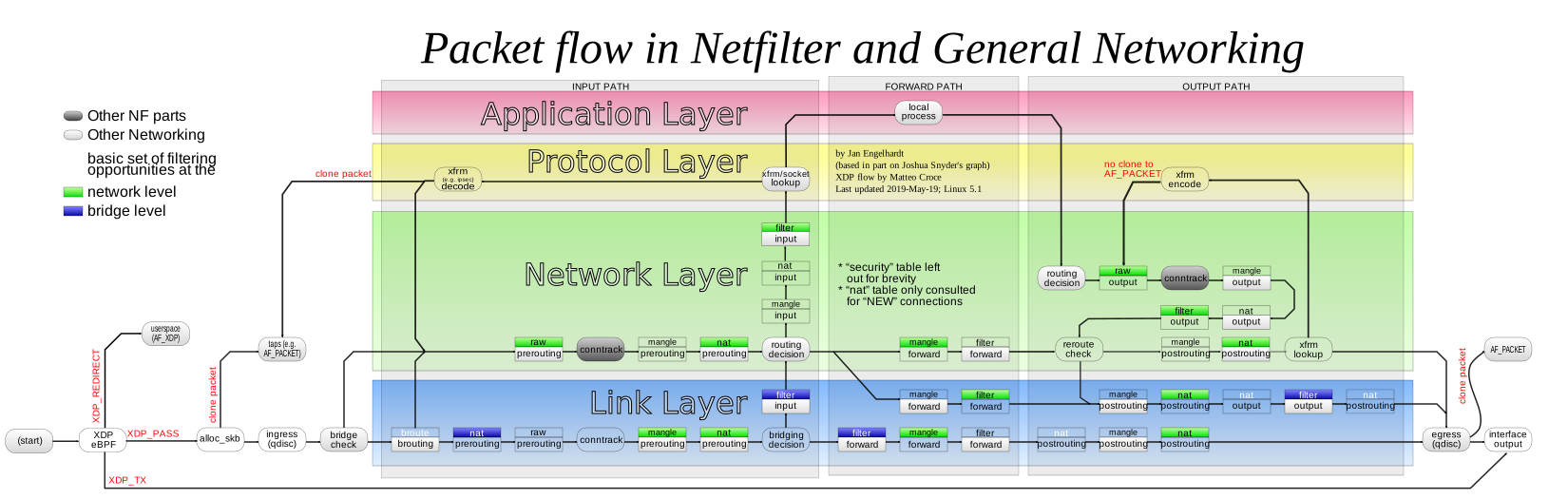
You are here. No, wait.

If this graphic was correct, I was about to get in before Netfilter -- by changing my fix-up hook to run in the OUTPUT/raw chain and table. I gave it a shot, and...

root@ubuntu:/home/mykill# echo asdf | nc -v 5.5.5.5 9999
Connection to 5.5.5.5 9999 port [tcp/*] succeeded!
asdf

VICTORY!

It was a hard-fought battle, but I actually was able to confirm my suspicions thanks to the very readable code in the Netfilter portion of the kernel and some very helpful documentation. It's fun to be working on Linux again!

Wednesday, March 30, 2016

TIL: Accessing memory in another process under Linux

Today it was hit home for me that I am now a "Windows guy", because I couldn't remember the name for the select or epoll syscalls, only muttering "WaitForMultipleObjects?" and scratching my head. This was hit further home because I couldn't think of anything other than ptrace for accessing another process's data. Granted, my friend says I've always been a Windows guy and I should get over it. But I really only started learning about how computers work when I began working with Linux, so this bothered me. Hence, I took a little walk down syscalls.h in 3.7.1 to see what would jog my memory or what new things I would find. Indeed, I did find something interesting and relevant.

include/linux/syscalls.h:
856 asmlinkage long sys_process_vm_readv(pid_t pid,
857                      const struct iovec __user *lvec,
858                      unsigned long liovcnt,
859                      const struct iovec __user *rvec,
860                      unsigned long riovcnt,
861                      unsigned long flags);
862 asmlinkage long sys_process_vm_writev(pid_t pid,
863                       const struct iovec __user *lvec,
864                       unsigned long liovcnt,
865                       const struct iovec __user *rvec,
866                       unsigned long riovcnt,
867                       unsigned long flags);

And here is a bookmark to the relevant file in LXR.

It's been a long time since I hacked on Linux, but I wonder what other interesting things have been added since I went over to the dark side (or came back to it, depending upon how you look at it).

Monday, December 29, 2014

How to Stop Bashing and Take CMD

A colleague of mine is a Linux hacker who took a job in Seattle and has been thrust into Windows.  On his team, PowerShell is not always available, so he's left saying "look dude, I know bash; what the heck do I do with this??"  If you're in a similar situation, this is a primer for you.

Below are a few bash-isms and Unix-isms, and their cmd.exe analogues, as well as some things that are purely from CMD.  To try them, open up cmd.exe (Start > Run: cmd.exe, or Windows+R: cmd.exe) and go to town.

One-Liners

I'll start with some one-liners.  The $ prompt indicates commands that can be used in bash on GNU/Linux and similar operating systems, and the > prompt represents the cmd.exe equivalent.  Omit the prompts ($ and >) when trying these commands.

Run something else
$ bash -c something else
> cmd /c something else
> cmd /k something else

In the latter command, cmd will stay resident and permit further commands.

Display program return value:
$ echo $?
> echo %ERRORLEVEL%

Some programs, when they are run, return a numeric status code.  Generally, 0 indicates success, and 1 or greater indicates an error.  Windows executables that display graphical windows (calc.exe and winword.exe are examples) return 0 immediately and unconditionally, and run "asynchronously" -- meaning, the command prompt receives the return value immediately and allows the user to type more commands.

Compare program return value:
$ if [ $? -eq 0 ]; then echo Success; fi;
> if %errorlevel% == 0 echo Success

Find program in path:
$ which which
> where where


Find file:
$ find / -type f -name whatever\*.txt
> dir /s \whatever*.txt
> dir /a/b/s \whatever*.txt

The latter command will show all files, even those having the hidden attribute (/a) and will provide bare output without any file sizes or other details (/b).

Find string in files:
$ grep -Ri needle *
> findstr /S /I needle *

Find string in program output:
$ ifconfig | grep 192
> ipconfig | findstr 192

Start service (e.g. mysql):
$ service mysql start
> sc start mysql
> net start mysql

The latter command (net.exe) can do many things including viewing and modifying local groups, authenticating to network shares and mapping them to drive letters, etc.  The other command (sc.exe) is strictly for starting and stopping services, viewing their configuration, and other tasks.

Restart web server:
$ apachectl -k restart > /dev/null 2>&1
> iisreset > nul 2>&1


Terminate by pid:
$ kill -s 9 916
> taskkill /f /PID 916


Terminate by name:
$ killall -s 9 kcalc
> taskkill /f /IM calc.exe


Shut down:
$ shutdown -h now
> shutdown /s /t 0


Reboot: 
$ shutdown -r now
$ reboot
> shutdown /r /t 0


Add user to group: 
$ useradd -G root mike
> net localgroup administrators /add mike


Set environment variable:
$ variable=hello
> set variable=hello


Display environment variable: 
$ echo $variable
> echo %variable%


Prompt for environment variable:
$ read -p "Type something: " variable
$ echo $variable
> set /p variable=Type something:

> echo %variable%

Pre-set variables such as username:
$ echo $USER
> echo %username%


Dump environment: 
$ setenv
> set


The SET command also accepts partial variable names, and will list all the variables and values whose names match that string.

Compare files:
$ cmp file1 file2
> fc file1 file2

You can check the errorlevel (the numeric error or success code returned by the program) to determine whether the files are the same.  Identical files result in a 0 errorlevel, and differing files result in a return value of 1 or greater.

Display file contents:
$ cat file
> type file

> more file

The latter command, more, can be used to display the contents of those notorious alternate data streams, and also serves as a pager (see next).

Display file contents with pager:
$ less file
$ cat file | less
> more file
> type file | more


Loops:
$ for ((n=2; n<=8; n+=2)); do echo $n; done
> for /l %n in (2, 2, 8) do echo %n


Operate on a set of arbitrary words: 
> for word in hello there; do echo $word; done
$ for %w in (hello there) do ( echo %w )


Echo the names of all text files in the current dir:
 > for file in *.txt; do echo $file; done
$ for %f in (*.txt) do echo %f


Echo the names of all text files recursively: 
$ for file in $(find . -name \*.txt); do echo $file; done
> for /f "usebackq" %f in (`dir /a/b/s *.txt`) do echo %f
> for /r %f in (*.txt) do echo %f


Parse IP addresses out of IP configuration:
 $ echo IP: $(ifconfig | grep 'inet addr' | awk -F: '{print $2}' | awk '{print $1}')
>for /f "usebackq delims=: tokens=1,2" %a in (`ipconfig ^| findstr /i IPv4`) do echo IP: %b

Scripts

Read file, find pattern, copy to another location

cprintf.sh:
#!/bin/bash

dstdir=~/cfiles;
rm -rf $dstdir;
mkdir $dstdir;

for file in $(find . -type f -name \*.c); do
    grep -i printf $file > /dev/null 2>&1;
    if [ $? -eq 0 ]; then
        cp $file $dstdir;
    fi;
done;


cprintf.cmd:
@echo off

set dstdir=%userprofile%\cfiles
if exist "%dstdir%" rmdir /s /q "%dstdir%"
mkdir "%dstdir%"

for /r %%f in (*.c) do (
    findstr /i printf %%f > nul 2>&1
    if not errorlevel 1 copy %%f "%dstdir%" > nul 2>&1
)


Because of the idiosynchrasies of the Windows command interpreter and native utilities, writing robust scripts for CMD is akin to any of the following activities:
  • Leveling and hanging a picture in an earthquake
  • Making a bed with a rabid dog in it
  • Asking a room full of four-year-olds to each draw a triangle
  • Wrestling with a snake, a crab, and an orangutan at the same time
  • Balancing a system of simultaneous equations by inspection while inebriated
Here are the idiosynchrasies that are relevant to the above script:

Double percent signs (e.g. %%f) are used to denote loop variables in .cmd and .bat files instead of single percent signs (e.g. %f) as on the command line.  Variable names must be a single character in length (e.g. %a on the command line, and %%a in a script file).

Also, evaluation of errorlevels can be done both by comparison with the %ERRORLEVEL% environment variable and using the IF [NOT] ERRORLEVEL construct.  The help for the if command (accessible by typing IF /?) states:

  ERRORLEVEL number Specifies a true condition if the last program run
                    returned an exit code equal to or greater than the number
                    specified.
And:

  NOT               Specifies that Windows should carry out
                    the command only if the condition is false.

Just so you've got that straight: don't ask the command interpreter this:

IF ERRORLEVEL 0 ECHO Oh yes, everything is fine <-- NO, IT IS NOT

There are some more turds in the punch bowl...

If you mean to set variables in a for loop and reflect on those values later in the script, you must first invoke SETLOCAL ENABLEDELAYEDEXPANSION.  To obtain the most up-to-date value of each variable, you must then use exclamation points, not percent signs, to access the data.  For example: !frick!.

If you use a pipe within a backtick expression in a FOR /F "usebackq" statement, escape the pipe with the caret symbol.  For example, `dir /a/b/s *.txt ^| findstr x`.

Windows scripts access arguments as %1, %2, etc.  Tilde modifiers such as %~n0 (equivalent to basename $1) are used to parse filenames, and can be found in the help for the FOR command. 

Environment variables inherently support substring selection and pattern replacement:

C:\Users\mykill>echo %username:kill=ke%
myke

C:\Users\mykill>echo %username:~0,3%
myk


I will probably update this article to include more info.  Suggestions are welcome.

For more loopy help:
for /?

The help from a few other commands can also be informative:
if /?
setlocal /?