Showing posts with label learning. Show all posts

Friday, February 3, 2017

Remember the Registers (or, the ABCs of x86)

I have a friend who is about to learn assembly language on x86. This means understanding how processor registers are used. So, I'm sharing some mnemonics for remembering the registers and their roles on x86. Maybe they will help you, too.

A register, by the way, is just a memory location that is directly (and quickly!) accessible by the processor, usually located in the processor circuitry as opposed to being accessible at a memory address (although this depends on the hardware).

Oh. Okay, so not one of these. Got it.


I'll completely omit floating point (and MMX/SSE) stuff, but I'll briefly mention amd64 for the sake of example.

A, B, C, and D

There are four general purpose registers whose names are basically A, B, C, and D. On old 16-bit Intel processors, they were named AX, BX, CX, and DX. From each of these, you could also access the low eight bits (e.g. AL, as in "A low") and the high eight bits (e.g. AH, as in "A high"), and you still can.

When 32-bit came along, they prefixed them all with an E (meaning "extended"), so now they are EAX, EBX, ECX, and EDX.

And when AMD devised their derivative amd64 architecture, they prefixed them all with an R, presumably meaning "really-friggin'-extended". So, on amd64, they are named RAX, RBX, RCX, and RDX.

The "A" register has a few special roles, but most importantly it is used to hold the return value (i.e. the result) when functions return to their callers.

The "C" register sometimes has a special role, too, that I'll describe next.

So much for A, B, C, and D.

String

Several string instructions (e.g. cmps and movs, stos, lods) have implied operands:
  • ESI = Source
  • EDI = Destination
  • ECX = Counter
  • EAX = Value to write (sometimes applicable, sometimes not)

Stack

The stack starts at a high address in memory and as things are added to it, it grows down to lower addresses. The processor keeps track with a stack pointer, and then functions can further use a "base" pointer to point to the boundary between the caller's stack (and two other pieces of data), and their own local variables.
  • ESP = Stack Pointer
  • EBP = Base Pointer

Instruction Pointer

So special that it's all alone under its own heading:
  • EIP = Instruction Pointer
This register points to the instruction that is about to be executed.

Extra Credit: Segment Registers

Remember in Windows 95 when blue screens used to report "CS:EIP = xxxxxxx"? Neither do I, let's pretend I didn't admit that. Anyway, that CS is a segment selector indicating the location of the code segment. Modern operating systems use a flat model, so they're mostly set the same.

  • CS = Code Segment
  • DS = Data Segment
  • ES = "Extra" Segment (meh)
  • SS = Stack Segment
  • FS & GS = Even more extra segments, using the letters that follow C, D, and E, namely F and G Segments
These registers are 16 bits long and contain integers called segment descriptors; the CPU reads the Global or the Local Descriptor Table (the GDT or the LDT) to find the base address and size of each memory segment indicated by those descriptors. Operating systems commonly use a "flat" model instead of a segmented model, so these may all contain the same value. Since segmentation is largely a non-issue now, the extra segment registers are sometimes used to point to interesting structures. For example: FS => Thread Environment Block (TEB) in userspace Windows 32-bit applications.

Summary

In review:

  • EAX, EBX, ECX, EDX = A, B, C, D; Note that the 'A' register holds function return values
  • ESI, EDI = Source, Destination (for string operations) - ECX may be the counter and EAX may used, too.
  • ESP, EBP = Stack Pointer, Base Pointer
  • EIP = Instruction Pointer
  • CS, DS, SS, ES, FS, GS = Code, Data, Stack, and Extra segments, followed by F and G Segments

For the authoritative reference on all of this, see the Intel processor manuals.

Happy hackin' :)

Saturday, November 5, 2016

Teachers


We've moved into our new home, and I was putting away all my computing books. This time, I decided to put them in a deliberate order, starting with the books that I read as a kid and moving on through the system layers, my education, my work, and my dabbling. Each time I see these books, they retell the story of how my curiosity grew into a professional pursuit, and they remind me how happy I am that I was able to connect with such an interesting profession. They make me think of my teachers...

During the summers, I spent a lot of time at my grandmother's house. One summer, my dad brought an old Compaq portable that the army had retired, and he set it up in the play room in her basement. I recall that the monitor supported b&w, amber, and green. Naturally, I preferred green. I used this to run newps.exe (The New Print Shop - you can play it on archive.org).


Newps allowed me to create small monochrome images (probably 64x64 pixels) and store a few dozen of them to a "folder". I learned that if I scrolled through the images by holding the down arrow, they would display sequentially, which allowed me to build short animations. I used this to create my masterpiece: a hand-dithered animation of my cousin, winking. Wow.

My dad also sometimes took me to the office with him and let me play on the computer. I remember playing some sort of DOS game and accidentally winding up in the GW-BASIC interpreter. I must have broken the game, because I saw a clubs suite, little faces, greek letters, and a mess of other inscrutable data pour out onto the screen. My dad told me these were called "characters", and that programmers probably used some of those characters to write the program. This idea blew my mind - the concept that something visual, graphical, animated - was written by someone. After that, every time I came in contact with a computer, I was preoccupied with working out what my dad must have meant when he said that software could be "written".

My dad later brought home an NEC laptop with Windows 3.11, and I stared closely at the dithering that was used to produce a realistically colored eel using 256 colors. Thinking of that thick laptop with the tiny screen reminds me that my dad was the first person to tell me to RTFM. When I wanted to understand how to play Rodents' Revenge, draw with MS Paint, or use a DOS command, he told me to read the help file.


After a while, CDs became more and more common, and the games I wanted to play were not available on floppy disks. I begged my dad for a CD-ROM drive until, one day, he walked in and threw one on my bed. When I asked him to install it, he told me to do it myself, and when I asked him how, he said "read the instructions." As a 13-year-old, I felt helpless and sorry for myself for about a split second. That was the day I learned about config.sys, emm386.exe, autoexec.bat, and mscdex.exe.

And then, RTFM I did. I somehow wound up with a copy of Dan Gookin's DOS for Dummies, which introduced me to EDIT.COM, boot disks, AUTOEXEC.BAT, and CONFIG.SYS. That summer, I became addicted to reading HELP.EXE while listening to techno all night. I unnecessarily used RAM drives to "accelerate" my file access. I used the VSAFE.COM TSR to protect myself from viruses (uh, right). I hid files from my family by placing them inside of compressed volume files (*.CVF) and applying file attributes to hide them. I had nothing worth hiding, but I just wanted to be able to hide stuff. Out of ignorance or unavailability of BIOS features, I wrote a batch file that used CHOICE.COM to password protect my computer and prevent my dad from taking up space with Internet Explorer 3.0 when I was a diehard Netscape Navigator user. And of course, I used filemgr.exe to delete Net Nanny. (Holy crap, are they still in business?!)

Then when I was in high school, my dad gave me a computer that went with me to my mom's house and had Windows 3.11 on it. My friend asked if it had a modem and I said yeah, but no AOL. He decided to come over, and the minute he saw it, he connected it to the phone line, popped up Terminal, and dialed into the DEC VAX at the University of Wisconsin - Milwaukee (UWM). From there, he ran telnet and connected to jgsdos.brooktrout.com, port 5000, and it was then that I learned about Zolstead's MUD (Multi-User Dungeon). The fact that a buddy could just walk up to a computer he had never seen before and connect over a phone line to a computer and then to another computer from there, once again blew my mind.

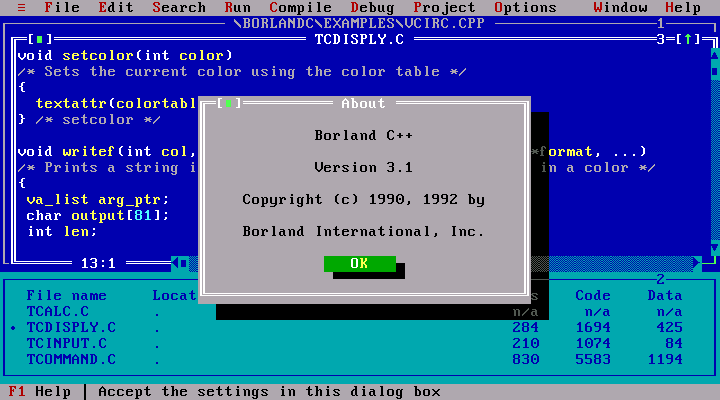
After that, it mushroomed. I found QBASIC.EXE and learned to write software. Awful software! But software, nonetheless. I started reading about C and my dad got me books about that. My friend introduced me to his buddy who, at the age of 14 or 15, seemed to already know everything about computers. While evading my girlfriend's parents, I hid at the public library and checked out an 800-page beginner's book on C++. I read the entire book before it was due back at the library and took copious notes. I was so intent on learning C++ that I wanted to buy a compiler, but Visual Studio was way too expensive, so I bought Boreland C++ 3.1, for $30.
High tech.
After that, I started looking around for where I could get more of this. I audited classes at UWM and attended two semesters of C++ courses at MSOE. When I realized that this was what college could be like, I just barely pulled out of my academic nose dive and persuaded the MSOE admissions staff that I was worth making an exception for.

I fondly remember many dozens of teachers and moments on the journey. My grandmother, who did me the incredible favor of teaching me to type. It was one of those boring basics that made everything else easier. John Carmack, who innovated video games and made me wonder about the connection between mathematics and 3D graphics. My cousin, who patiently explained, multiple times, the difference between RAM, CPU, hard disks, and floppy disks; let me use his AOL account; introduced me to GIFs; and repeatedly reminded me how to get my computer to run Gorillas.


Then there were the teachers of my professional career. Professors, University staff, and in later years, other students. My boss at my first job. The friend who saw me reading about shellcode and Linux drivers and decided to pull me into a community of hackers. The people I worked with there. And as a consultant. And as a reverse engineer.

Now, I see almost everyone I meet or know or even read about as a teacher. It's what we all are, because we're doing what we love and we want to connect other people with something we feel is very powerful. These books remind me of all the teachers I ever had. The MS DOS 5.0 user manual, Patterson & Hennesy's Computer Organization & Design, The Shellcoder's Handbook, Mastering Algorithms with C, Rootkits... My dad, my friends, my colleagues, and my co-workers.

To this day, I am trying to figure out what the sequence of events has to be to elicit and maintain a learner's interest in some discipline of study. The learners I am interested are young, old, and in-between. Here are some of my thoughts on how to engage them:
  • Get the learner past the "boring basics" that make everything else available, possible, and achievable.
  • Create opportunities for "magic moments" by exposing the learner to as many facets of our world as are available to you; when you see a "magic moment" take place, figure out how to encourage and help create more of them - gently though, because the moment you find yourself leading the horse to water, you will be disappointed to find that it is no longer thirsty.
  • Never let yourself get in the way of a learning opportunity. When you are asked to facilitate an obsession, provide the materials and let the learner do the work.
  • When we are willing to invest precious resources (time, education, or equipment), we show that we take the learner's studies seriously, and the learner has an opportunity to take themselves and their studies more seriously as well, which can lead to more focus and more courage.
  • Always be open to explaining how things work.
Maybe if I'm lucky, I will think of more things to add to this list.