Showing posts with label CTF. Show all posts

Thursday, October 20, 2016

This one weird trick for decoding DLL malware strings

TL;DR: argtracker and ctypes. It's the ctypes part that surprised me. Read on to see why.

This procedure can make light work of decoding strings in a DLL that has a horrifying string decoder or contains a metric ton of strings. The first stage leans on code that's already out there, with a bit of duct tape to get to the second stage; the second stage is to load your malware and call into it. There's just one stick-in-the-mud limitation: it has to be a file you can load into your address space using LoadLibrary, such as a DLL. Otherwise, you have to use a different kind of tool (I'll discuss this later).

First of all, gather all the strings you want to decode. Jay Smith wrote a very cool tool for this that uses Vivisect to emulate code and locate arguments. It's called argtracker. Don't duplicate it like I was starting to do with idaapi. Please, for the love of all that is lazy, just download it and get it installed.

The IDA Python script below is basically the code from the FireEye blog with a second function added to print all the encoded strings out so you can feed them to the second stage of this procedure. If your strings aren't printable prior to decoding, then you'll need to change this up a bit.

import vivisect
import flare.argtracker as c_argtracker
import flare.jayutils as c_jayutils

# Obtain the address where each argument is referenced by the decoder along
# with the offset that was referenced
def get_first_push_arg(decoder):
    ret = []
    vw = c_jayutils.loadWorkspace(c_jayutils.getInputFilePath())
    tracker = c_argtracker.ArgTracker(vw)
    xrefs = idautils.CodeRefsTo(decoder, 1)
    for xref in xrefs:
        argslist = tracker.getPushArgs(xref, 1)
        for argdict in argslist:
            va_at, offset = argdict[1]
            ret.append(argdict[1])
    return ret

# Now go get each string
def print_va_off_and_contents(pushed_args):
    print('refva, off, argcontents')
    for (va_at, offset) in pushed_args:
        print(hex(va_at) + ', ' + hex(offset) + ', ' + GetString(offset, -1, 0))
        # https://www.hex-rays.com/products/ida/support/idadoc/283.shtml
        # 0 <= ASCSTR_C
        # 3 <= ASCSTR_UNICODE

Provide your decoder's virtual address to get_first_push_arg, and then supply the returned list to print_va_off_and_contents to get something you can massage into shape for the second stage. Yes, I know, I'm using print instead of Python's logging module. The title of this blog was actually going to have the word "lazy" in it. Maybe it still should. Anyway...

Second and final step: load the malware and call its decoder. The interesting thing I learned is that Python ctypes can call non-exported functions. What a happy surprise! First, you have to define a function prototype, then you obtain a callable by hooking that prototype to an address in your binary where the function lives. There are prototypes for stdcall (WINFUNCTYPE) and cdecl (CFUNCTYPE). We're using stdcall. Here's a convenient snippet along with the string decoding goodness.

from ctypes import *

# Modify all this
offset = 0x4321                             # Decoder offset in your mal DLL
strings = [                                 # Populate from stage 1 (above)
    [0x10001234, "ABCdef"],
    [0x10005678, "ZYX990"],
    ...
]
dll = cdll.my_malware_dll                   # Modify to load your DLL
prototype = WINFUNCTYPE(c_char_p, c_char_p) # Stdcall, accepts & returns char*

# Leave this alone
string_decoder_addr = dll._handle + offset
decode = prototype(string_decoder_addr);

for (va, s) in strings:
    print(hex(va) + ' ' + s + ' -> ' + decode(s))

Simple, dimple. Paste the strings from IDA Pro into this script, ctypes loads and calls into the malware, and Bob's your uncle. For extra credit, you can update this script to emit another script that will create the appropriate comments or bookmarks in IDA Pro. This ctypes procedure works great for DLLs. Unfortunately, next time, it'll probably be an EXE and not a DLL. For those cases, you'll have to adapt this to a different tool, such as flare-dbg, to control malware execution and feed it the strings you want to decode. I'll talk more about tools and techniques for this another time.

Thursday, March 24, 2016

Beasting it

Wherein, I share brute force tools based on treating strings like numbers.

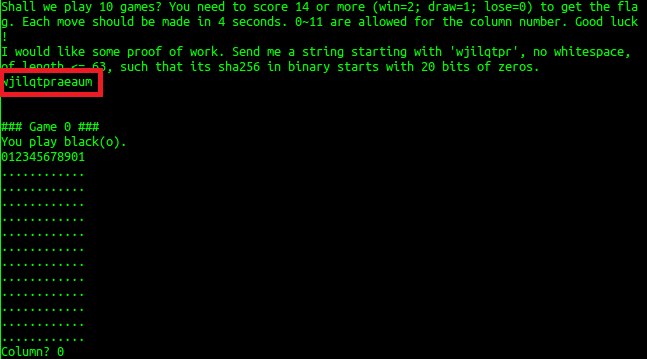
Working in offensive security has opened my mind to the fact that hacks don't have to be beautiful. So in working a couple CTFs recently, brute force has readily come to mind for me (as you can see from other articles on my blog). This recently happened again, when I had an opportunity to run a brute force over the network (yes, very slow, but it was a small character set, so why not) in tandem with working out the real solution, as well as in BCTF 2016 where we were asked to calculate a string whose SHA-256 hash begins with 20 cleared bits.

Sure, what the hay

I wrote a tool in Python, and another in C++, to treat strings as numbers of radix equal to the number of characters in the set of valid characters for the problem. By incrementing each "digit" of the string, and rolling over to the next when necessary, an incrementable string class iterates through all possible values for strings of that length and character set. Both tools use this to brute force a solution using strings of increasing length until either the solution is found or the sequence terminates.

It seems that these sorts of things arise semi-frequently in CTFs, so I generalized these into a single-source-file "framework", polished them up a little bit, and am sharing them below.

As an example, here is the amount of C++ code I would have needed to write using <openssl/sha.h> and linking with -lcrypto to brute force the hash in the BetaFour challenge using this framework. It includes an evaluator callback (try_a_value) that determines whether the current brute force buffer value satisfies the problem, and two supporting functions to hash the value and to determine whether the hash begins with 20 bits of zeroes (it assumes little-endian).

bool
try_a_value(unsigned char *val)
{
    unsigned char md[SHA256_DIGEST_LENGTH];

    PDEBUG("Trying %s\n", val);
    hash(val, md);
    return first20bits0(md);
}

bool
first20bits0(unsigned char *md) { return !(*((uint32_t *)md) & 0x00f0ffff); }

/* Calculate SHA-256 digest of string */
void
hash(unsigned char *startingwith, unsigned char *md) {
    SHA256_CTX ctx;
    unsigned char *data = startingwith;
    int len = strlen((const char *)startingwith);

    SHA256_Init(&ctx);
    SHA256_Update(&ctx, data, len);
    SHA256_Final(md, &ctx);
}

Only 24 lines including whitespace and comments. This will make it easier to for me to work on such challenges in the future, so in the spirit of openness and nerdy hackery, I thought I would share it.

Brutiful C++ and Python brute force tools for Windows and Linux:

Thursday, October 22, 2015

Flare-On 2015 #2 Write-Up, Part 2

Well, I guess I can post the script and results, now that Flare-On has been over for over a month! I'll continue from where I left off in my previous article.

Previously, I implemented a function to skip the ReadFile call and stuff arbitrary passwords into the challenge binary's input stream. By experimenting with this, I discovered a potential tell that might allow me to brute force the password by counting the number of times a particular instruction was executed. To make use of this, I needed to execute the binary several times with different passwords (aaaa..., abaa..., acaa...), moving on to the next character each time an additional sahf instruction was executed.

To do this, I knew I would first need to figure out which characters are valid for email addresses. I settled on a variant of the information available from a stackoverflow inquiry:

g_valid = 'abcdefghijklmnopqrstuvwxyzABCDEFGHIJKLMNOPQRSTUVWXYZ0123456789.#-_~!$&\'()*+,;=:%{|}\\/?@'

The next step was to initialize a buffer that would serve as my brute force password. How long could the password be? Based on the length comparison at the start of the password processing function...


It looked as if the program was seeking a 37-byte password. So, I whipped one up:

g_pw = list('a' * 37)

In order to move through candidate passwords, I iterated through valid characters for each character position of the brute force password:

    for pos in range(0,37):
        for c in g_valid:
            g_pw[pos] = c


To measure my progress, I executed the binary with one breakpoint set to stuff the brute force password into the program's input buffer and the other breakpoint set to count sahf instructions:

            trace = vtrace.getTrace()
            trace.execute(sys.argv[1])
            trace.addBreakpoint(MyBreakpoint(0x400000 + 0x1046, skipread))
            trace.addBreakpoint(MyBreakpoint(0x400000 + 0x10ae, count_iters))
            trace.setMode("RunForever", True)
            trace.run()

And finally, I compared the number of sahf breakpoints hit in each successive occurrence against the previous maximum. If an additional breakpoint was hit, I advanced to the next character position in the brute force password and began working on that character. The script in its entirety looked something like this:

 1 # coding: utf-8
 2 import vtrace
 3 import vdb
 4 import sys
 5 import struct
 6 
 7 # Offsets for d88dafdaefe27e7083ef16d241187d31 *very_success.exe:
 8 # cs:0x4010ae <-- sahf instruction: single iteration of password character scan
 9 #   baaaaaaaaaaaaaaaaaaaaaaaaaaaaaaaaaaaa - breakpoint hits once
10 #   aaaaaaaaaaaaaaaaaaaaaaaaaaaaaaaaaaaaa - breakpoint hits twice
11 # Trying brute force by counting breakpoint hits
12 # cs:0x401046 <-- call kernel32!ReadFile, len at ebp-4
13 # cs:0x40104c <-- return from kernel32!ReadFile, len at ebp-4
14 # ds:0x402159 <-- gPasswordFromCONIN$[]
15 
16 # Props to: http://www.limited-entropy.com/stuff/drmless.py.txt
17 class MyBreakpoint(vtrace.Breakpoint):
18     def __init__(self, address, callback):
19         vtrace.Breakpoint.__init__(self, address)
20         self.address = address
21         self._cb = callback
22 
23     def notify(self, event, trace):
24         self._cb(trace)
25 
26 # Count of times sahf instruction was encountered in character scan loop
27 g_bp_count = 0
28 
29 # Count how many times sahf instruction was encountered in character scan loop
30 def count_iters(trace):
31     global g_bp_count
32     g_bp_count = g_bp_count + 1
33 
34 # Skip past ReadFile() call and tell the program that it received the bytes in
35 # the array g_pw
36 def skipread(trace):
37     trace.setProgramCounter(0x400000 + 0x104c)
38     print "\nTrying " + ''.join(g_pw)
39     tmp = ''.join(g_pw)
40     trace.writeMemory(0x400000 + 0x2159, tmp)
41     trace.writeMemory(trace.parseExpression("rbp-4 & 0xffffffff"), struct.pack("@i", 37))
42 
43 if len(sys.argv) != 2:
44     print "Usage: test.py filename"
45     sys.exit(1)
46 
47 # http://stackoverflow.com/questions/2049502/what-characters-are-allowed-in-email-address
48 g_valid = 'abcdefghijklmnopqrstuvwxyzABCDEFGHIJKLMNOPQRSTUVWXYZ0123456789.#-_~!$&\'()*+,;=:%{|}\\/?@'
49 
50 g_pw = list('a' * 37)
51 g_pw.append("\0")
52 g_breaks = 0
53 while True:
54     for pos in range(0,37):
55         for c in g_valid:
56             g_pw[pos] = c
57             g_bp_count = 0
58 
59             trace = vtrace.getTrace()
60             trace.execute(sys.argv[1])
61             trace.addBreakpoint(MyBreakpoint(0x400000 + 0x1046, skipread))
62             trace.addBreakpoint(MyBreakpoint(0x400000 + 0x10ae, count_iters))
63             trace.setMode("RunForever", True)
64             trace.run()
65             print "Breaks " + str(g_breaks)
66 
67             if (g_bp_count > g_breaks):
68                 g_breaks = g_bp_count
69                 break

The result was a little bit like a cinematic depiction of a password being brute forced, because the characters kept rolling by and locking in as the attack progressed:

Very Success!

In the screenshot above, you can see the output of the CTF binary (very_success.exe) interspersed with the script indicating what password was being tried (e.g. "Trying a_Little_b1t_baaaa...").

Using vtrace made this an incredibly cool learning experience, but it wasn't without its pitfalls. For instance, I was really excited when I found this snippet in the help for the Trace class:

     call(self, address, args, convention=None)
         Setup the "stack" and call the target address with the following
         arguments.  If the argument is a string or a buffer, copy that into
         memory and hand in the argument.

However, when I tried using this, I was disappointed to learn that I was out of luck:

Well, crap.

It could be that running a 32-bit binary in a WoW64 environment causes this condition, but I didn't have time to investigate, so I just went with executing the program over and over and over again, which worked fine.

There was also a flaw in my own process. I noticed that at various character positions, my assumptions broke down and the brute forcer ran off into the weeds. I suspect this was a function of the binary itself and not of the instrumentation tool (vtrace). With a little guesswork and some script adjustment, I was able to resume from various points in the process and pull the remainder of the password out of the binary:

a_Little_b1t_harder_plez@flare-on.com

After I submitted the flag, FLARE sent me the next binary and I celebrated by abandoning the CTF altogether, as I ultimately knew might happen due to my busy life. But I was glad I took the approach of figuring out how to create a scalable and repeatable instrumentation process for analyzing and abusing binaries. There are other tools out there, but vtrace is unique in that it doesn't require you to compile a DLL, and it allows you to make use of Python to instrument applications. Very useful!

Thursday, August 27, 2015

Flare-On 2015 #2 Write-Up, Part 1

I've been away from CTFs for a while, but at the urging of some colleagues, I took a brief look at this year's Flare-On challenge. I won't post a complete write-up today because I wouldn't want to give away the flag itself before the Flare-On challenge ends on September 8th. But maybe this article will give you ideas if you are still working on any of the challenges.

Because I knew I wouldn't be able to stay with it, I focused on using my time to learn how to do new things. The first challenge was easy and educational because FLARE produced a relevant write-up in 2014 that includes an IDA script to decode XOR-encoded data, a technique which has also been documented in Practical Malware Analysis. The second challenge, however, featured some unusual instructions in its decode-and-check loop:


The sahf, adc, and popf mnemonics were unfamiliar to me, however this did not look like a case of disassembly desynchronization. I started by reading the Intel manuals...


...but my short attention span got the better of me. So, I began using WinDbg to see why the sahf and adc instructions were used, what effect they would have on the program's control flow, and whether I was wrong about the disassembly desync. After a single iteration of this, I decided that my laziness and short attention span would require me to create a repeatable substrate for an iterative process of observation and experimentation: I needed automate the instrumentation.

There are several options for this. The painstaking way would be to pick up the code I wrote based on Microsoft's debugger documentation and a CodeProject article from 2011. Other alternatives included experimenting with DynamoRIO or Intel's PIN (which I will get into another time). And then there's Visi's vtrace. This latter tool is Python-based, so it was pretty appealing. I decided to give it a shot.

First, I downloaded the vtrace/vdb distribution (I might have grabbed it from here). Then I took a look at Visi's article to get started. I also found an interesting presentation and a PlaidCTF write-up that provided me with some additional ideas.

Reversing in IDA gave me some offsets to start with:

# Offsets for d88dafdaefe27e7083ef16d241187d31 *very_success.exe:
# cs:0x4010ae <-- sahf instruction: single iteration of password character scan
# cs:0x401046 <-- call kernel32!ReadFile, len at ebp-4
# cs:0x40104c <-- return from kernel32!ReadFile, len at ebp-4
# ds:0x402159 <-- gPasswordFromCONIN$[]

With this, I wrote a vtrace script that used the MyBreakpoint class in the presentation above to manipulate program execution and mark how many times the sahf instruction was hit. Specifically, I wrote a function to skip the ReadFile() Win32 API call and instead feed a password of my choosing to the program:

34 def skipread(trace):
35     print "Broken at eip = " + hex(trace.getProgramCounter()) + " (skipread)"
36     trace.setProgramCounter(0x400000 + 0x104c)
37     print "Trying " + ''.join(pw)
38     tmp = ''.join(pw)
39     # buf = pw.encode('utf-8')
40     trace.writeMemory(0x400000 + 0x2159, tmp)
41     print "ebp: " + hex(trace.parseExpression("rbp"))
42     print "ebp-4: " + hex(trace.parseExpression("rbp-4"))
43     print "[ebp-4]: " + hex(trace.parseExpression("poi(rbp-4) & 0xffffffff"))
44     trace.writeMemory(trace.parseExpression("rbp-4 & 0xffffffff"), struct.pack("@i", 37))

I executed this with a few different passwords. Of particular interest were the results with all "a" characters and all "b" characters:


I noticed something useful here: the breakpoint I had set on the sahf instruction to mark the number of loop iterations was hit once more when processing the "a" password than when processing the "b" password. Looking back on my notes, I see that I was enthusiastic about this:
Holy **** yes, saw password processing breakpoint hit twice for 'a'x37 and only once for 'b'*37
The reason for my excitement was that this probably meant the password could be brute forced. So, that is exactly what I did. Sure, maybe I skipped the whole part where you analyze and understand the code. But there's more to life than intimately understanding every Intel instruction I've ever encountered. In my next article, I'll post the scripts and talk about the results.